Utilities Billing System for Dynamics 365 Business Central User Guide
Setup
Before You Begin
Prerequisites in Business Central
The solution posts into standard BC finance, so the following must already exist in your Business Central company before configuration:
-
G/L Accounts for debtors control, VAT, late fees, customer deposits, solar sales, and disconnections --- The direct-posting accounts you will map in Billing Setup.
-
VAT Product Posting Groups for standard, zero, and exempt rates.
-
No. Series for billing invoices, deposit debit notes, solar credit notes, late-fee debit notes, and disconnections.
-
A Gen. Journal Template and Batch for billing postings.
Billing Setup
The Master Configuration
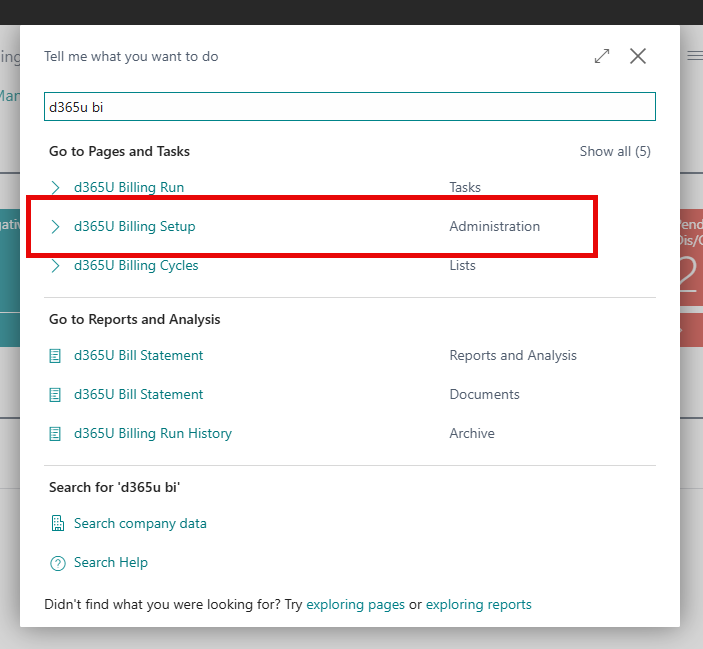
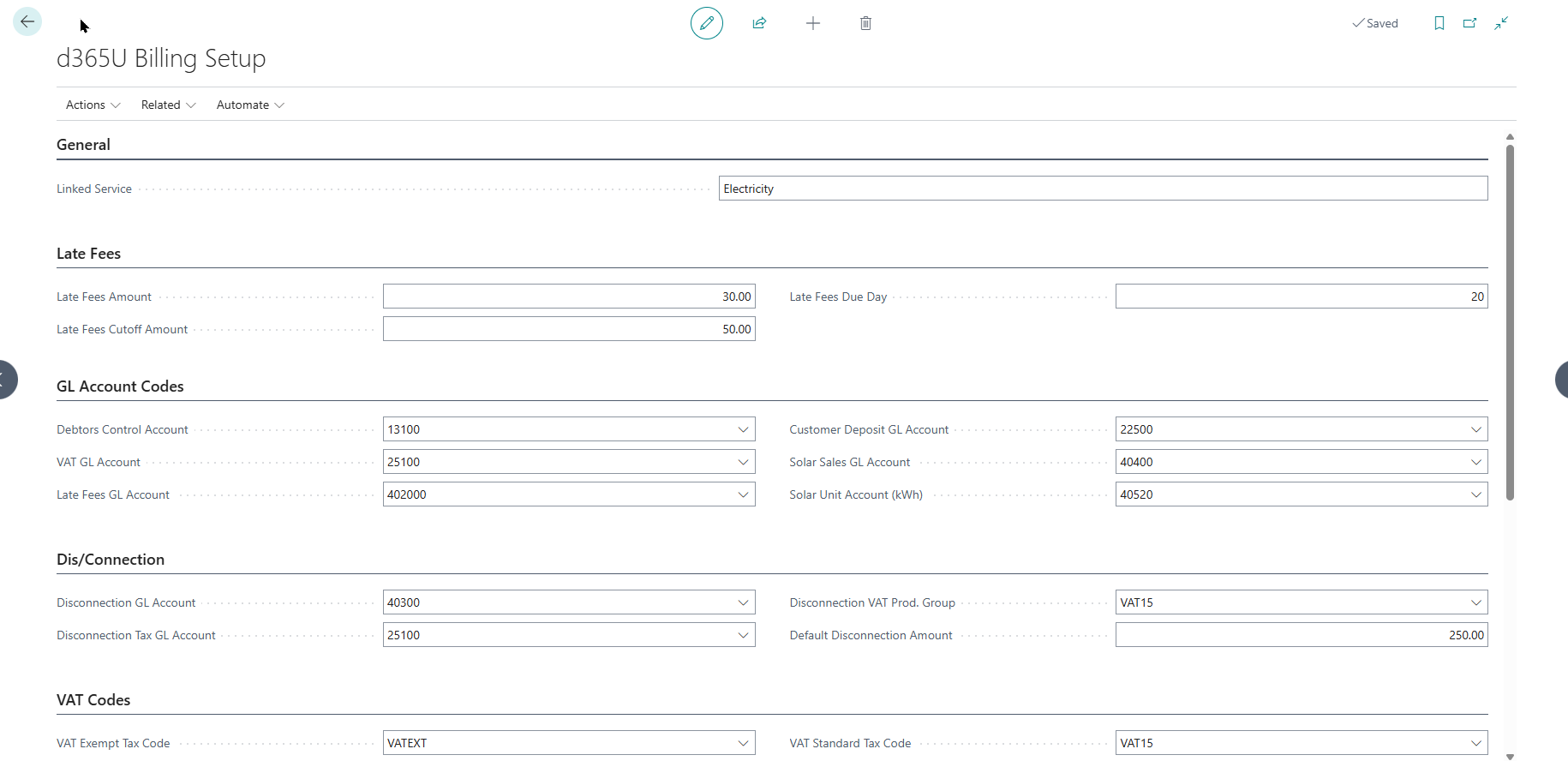
Open d365U Billing Setup. This single card holds the company-wide defaults, GL account mappings, VAT codes, number series and thresholds. It is a single-record page --- you cannot create a second one.
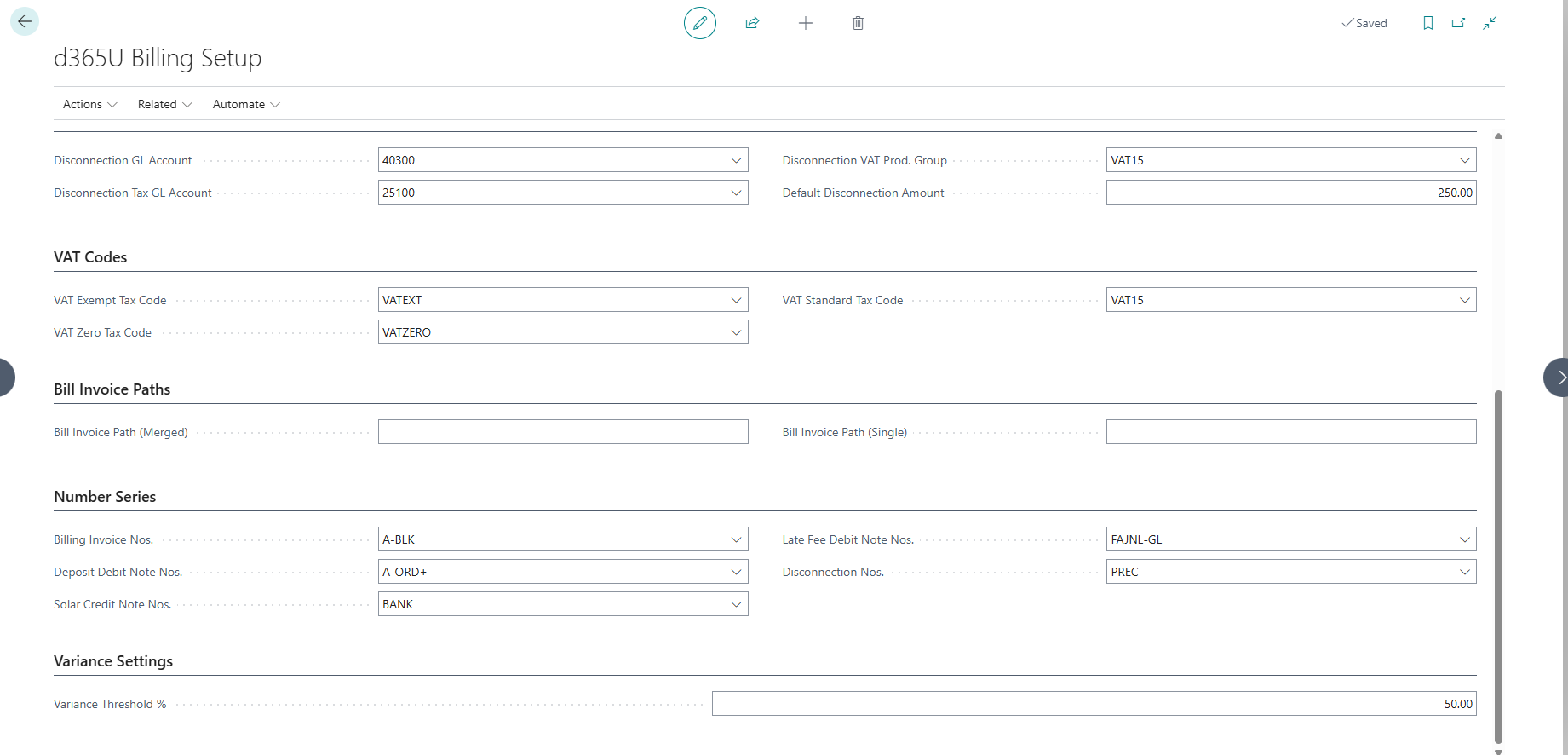
Work through it group by group; the fields below match the groups on the page.
General
| Field | What it does & how to set it |
|---|---|
| Company Name | The utility’s name as it should appear on billing documents. |
| Linked Service | The service being billed. Defaults to Electricity. Set once per company. |
Late Fees
| Field | What it does & how to set it |
|---|---|
| Late Fees Amount | The fixed late-fee charge applied to overdue accounts. Must be 0 or greater. |
| Late Fees Cutoff Amount | The minimum overdue balance before a late fee is charged. Accounts below this are skipped. |
| Late Fees Due Day | Day of month a bill is considered due (1–28, default 20). Overdue is assessed against this day. |
GL Account Codes
Each of these maps a billing outcome to a General Ledger account. The main posting accounts must be flagged Direct Posting in BC. The system validates that every account exists.
| Field | What it does & how to set it |
|---|---|
| Debtors GL Account | Accounts-receivable control account customer invoices post to. |
| VAT GL Account | Account VAT is posted to. |
| Late Fees GL Account | Income account for late-fee charges (direct posting). |
| Customer Deposit GL Account | Liability account holding customer security deposits (direct posting). |
| Solar Sales GL Account | Income/contra account for solar buy-back (direct posting). |
| Solar Unit Account (kWh) | Statistical unit account tracking solar kWh. |
Dis/Connection
| Field | What it does & how to set it |
|---|---|
| Disconnection GL Account | Income account for disconnection/reconnection fees (direct posting). |
| Disconnection Tax GL Account | Account the tax portion of a disconnection fee posts to. |
| Disconnection VAT Prod. Group | VAT product posting group applied to disconnection charges. |
| Default Disconnection Amount | The standard disconnection fee proposed on new transactions. |
VAT Codes
These three map the billing engine’s VAT logic to your BC VAT Product Posting Groups, so each line is taxed correctly.
| Field | What it does & how to set it |
|---|---|
| VAT Standard Tax Code | VAT product posting group for standard-rated charges. |
| VAT Zero Tax Code | Group for zero-rated charges. |
| VAT Exempt Tax Code | Group for exempt charges. |
Bill Invoice Paths
| Field | What it does & how to set it |
|---|---|
| Bill Invoice Path (Merged) | Output path/reference for merged (batch) bill runs. |
| Bill Invoice Path (Single) | Output path/reference for single-invoice printing. |
Number Series
Point each document type at a BC No. Series so postings are numbered consistently.
| Field | What it does & how to set it |
|---|---|
| Billing Invoice Nos. | Series for billing sales invoices. |
| Deposit Debit Note Nos. | Series for deposit debit notes. |
| Solar Credit Note Nos. | Series for solar credit notes. |
| Late Fee Debit Note Nos. | Series for late-fee debit notes. |
| Disconnection Nos. | Series for disconnection transactions. |
Variance Settings
| Field | What it does & how to set it |
|---|---|
| Variance Threshold % | Consumption change vs. previous period (default 50%) above which a reading is flagged for review before it can be billed. Lower = stricter checking. |
Validate as you go Use the Validate Setup action on the Billing Setup card at any time. It checks that mapped GL accounts exist and required fields are populated, and reports anything missing before you go live.

Seasons
Open d365U Season List. Seasons drive which tariff set applies in a given month (many utilities price High and Low seasons differently). Define at least the seasons your tariffs reference.
| Field | What it does & how to set it |
|---|---|
| Season ID | Unique code for the season (e.g. HIGH, LOW). |
| Description | Readable name. |
| Season Type | High Season or Low Season — this is what tariffs and net-metering rates match on. |
| Start Month / End Month | Calendar months (1–12) the season covers. A wrap-around range (e.g. start 11, end 3) is supported for seasons that cross year-end. |
| Active | Whether the season is currently in force. Turn off rather than delete to retire a season. |

Towns & Areas
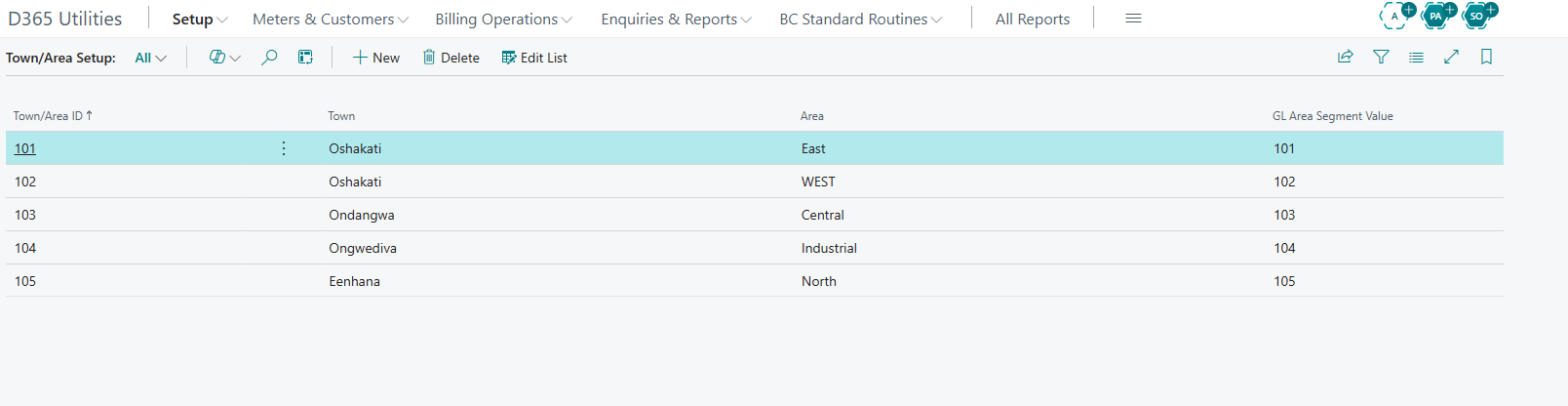
Open d365U Town/Area List. Areas group meters and customers geographically and can map to a GL dimension segment for area-level reporting.
| Field | What it does & how to set it |
|---|---|
| Town/Area ID | Unique area code. |
| Town | Town name. |
| Area | Area/suburb name. |
| GL Area Segment Value | Dimension value used to tag postings for this area, enabling revenue-by-area reporting. |
Billing Cycles
Open d365U Billing Cycles. A cycle groups accounts for a billing run and defines how its period-end date is calculated. Typically you set up one cycle for LPU and one for Non-LPU.
| Field | What it does & how to set it |
|---|---|
| Billing Cycle Code | Unique cycle code. |
| Description | Readable name. |
| Meter Type | LPU or Non-LPU — which population this cycle bills. |
| Month End Date | How the period-end is derived: Fixed End of Month (calendar month-end), Fixed Specified (a set day), or Variable. |
| Fixed Day | Used with Fixed Specified — the day of month (1–28) the period ends. |
| Previous / Current Run Date | System-maintained; updated automatically as runs complete. Not edited by hand. |

Meter Models
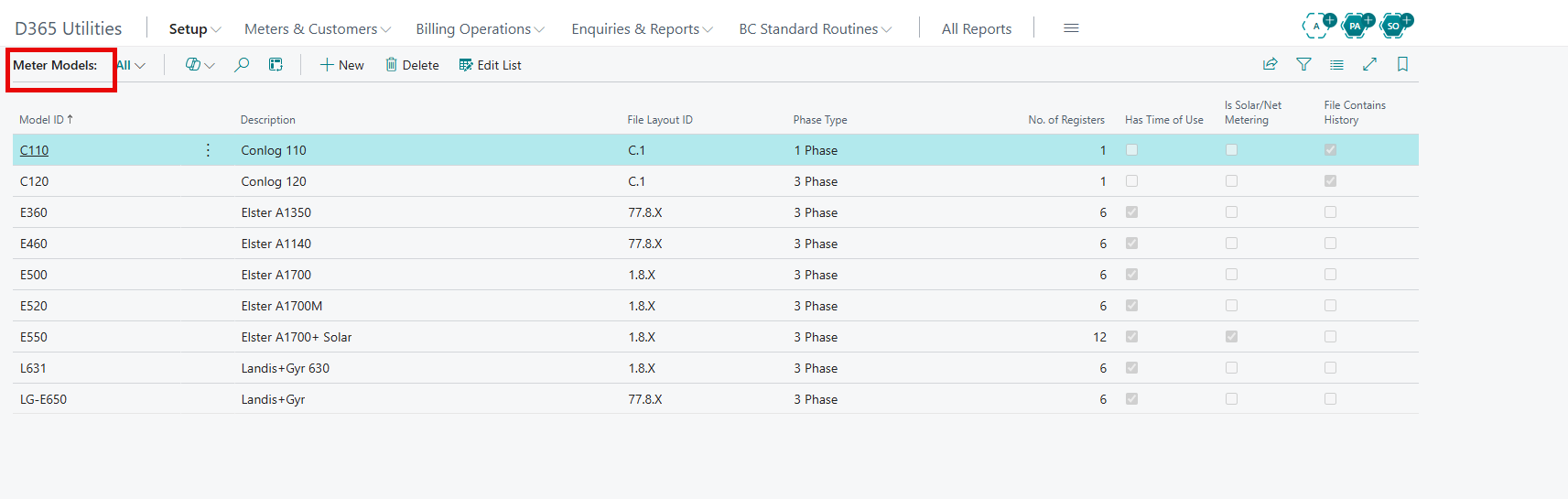
Open d365U Meter Model List. A model describes a class of physical meter and, crucially, the shape of its reading file. Register count is set automatically from the capability flags.
| Field | What it does & how to set it |
|---|---|
| Model ID | Unique model code. |
| Description | Model name/description. |
| File Layout ID | Identifier linking the model to its import file layout. |
| Phase Type | 1 Phase, 3 Phase, or Maximum Demand. |
| No. of Registers | Number of counters (1–12). Set automatically: 12 for solar/net metering, 6 for TOU, otherwise 1. |
| Has Time of Use | Tick if the meter records Peak/Standard/Off-Peak — sets registers to 6. |
| Is Solar/Net Metering | Tick for solar meters (import + export registers) — sets registers to 12. |
| Model from Filename | Tick if the model is identified from the import file name. |
| File Contains History | Tick if the file already includes previous readings (affects how baselines load). |
Meter Rate Types
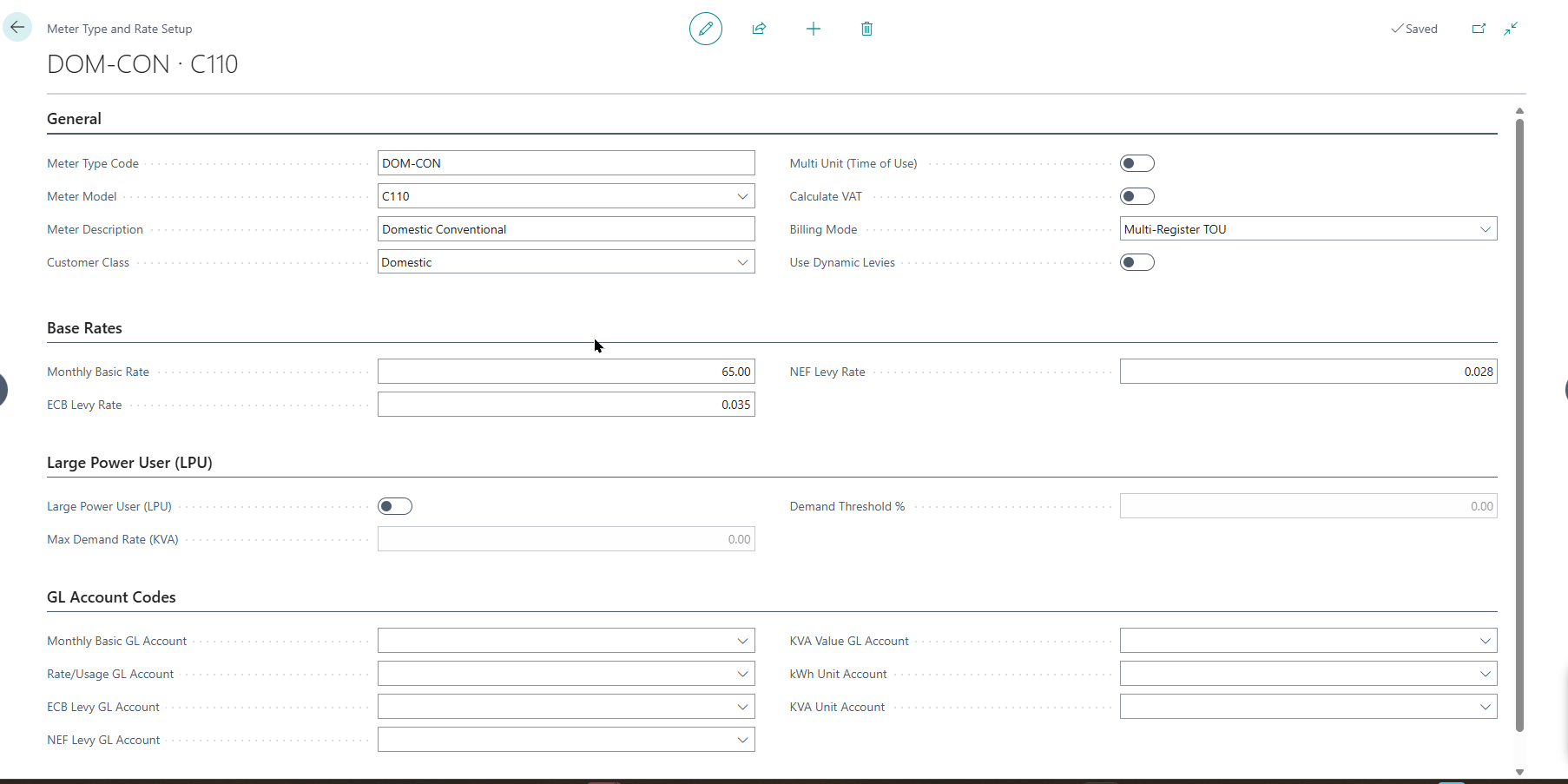
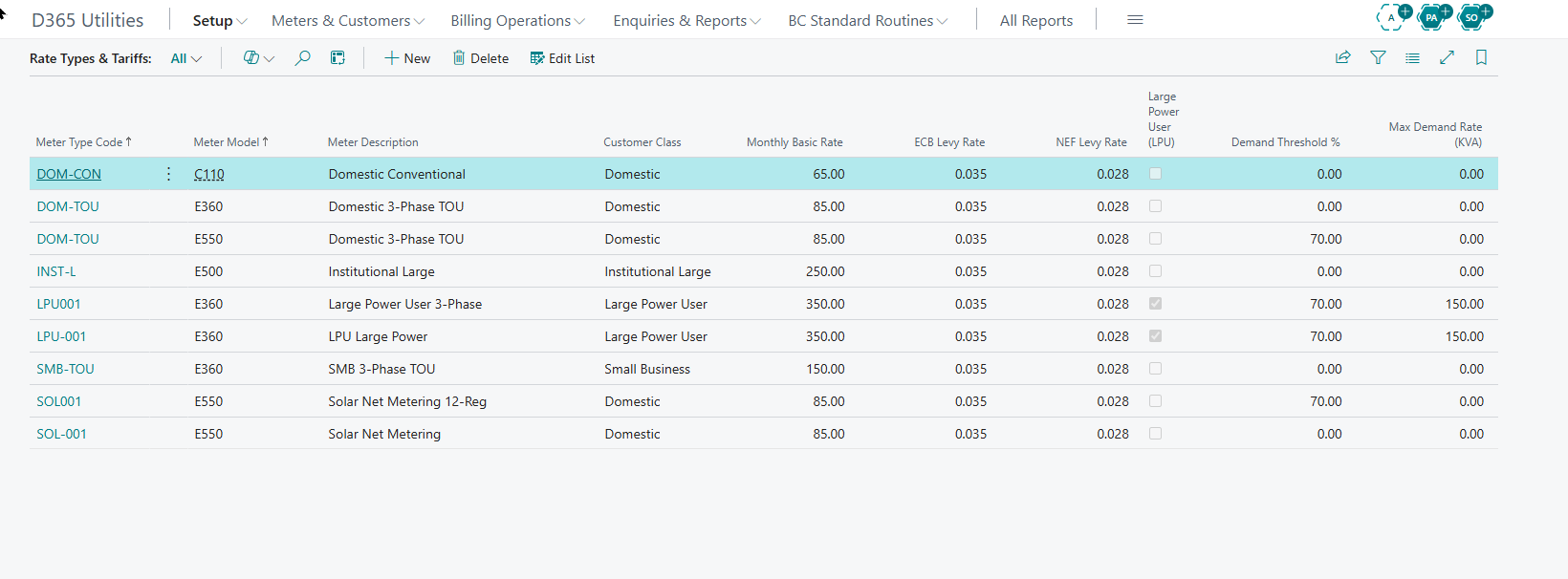
Open d365U Meter Rate Type List. This is the commercial heart of billing --- it defines the **fixed charges, levies, LPU/KVA behaviour, VAT handling ** and **GL accounts ** for a group of meters. Tariff (per-kWh) rates are added separately in the next step.
Identity & Classification
| Field | What it does & how to set it |
|---|---|
| Meter Type Code | Unique code for the rate profile. |
| Meter Model | The linked Meter Model (Section 7). |
| Meter Description | Readable description. |
| Customer Class | The class this profile serves: Domestic, Small/Medium Business, Large Power User, Institutional, Special, etc. |
Fixed Charges & Levies
| Field | What it does & how to set it |
|---|---|
| Monthly Basic Rate | Fixed monthly service charge applied regardless of usage. |
| ECB Levy Rate | Per-unit ECB levy rate. |
| NEF Levy Rate | Per-unit NEF levy rate. |
| Use Dynamic Levies | When on (default), levies from the configurable Levy table also apply — see Section 11. Lets you add levies without code changes. |
Large Power User / KVA Demand
These fields activate maximum-demand billing. When enabled, the system bills the higher of the actual KVA reading or the customer’s declared KVA multiplied by the threshold percentage.
| Field | What it does & how to set it |
|---|---|
| Large Power User (LPU) | Tick to enable KVA demand billing. Unticking clears the two fields below. |
| Max Demand Rate (KVA) | The charge per KVA of billed demand. |
| Demand Threshold % | The floor: billed demand = greater of actual KVA or (declared KVA × this %). Default 70%. This configurable threshold is a key differentiator. |
Metering Mode & VAT
| Field | What it does & how to set it |
|---|---|
| Multi Unit (Time of Use) | Tick if this type uses TOU registers. |
| Billing Mode | Multi-Register TOU (bill each TOU register separately) or Single Register (bill one combined total). |
| Calculate VAT | Whether VAT is applied to this type’s charges (default on). |
GL Account Mapping
Each charge component posts to its own account, giving fine-grained revenue reporting. Main revenue accounts must allow direct posting.
| Field | What it does & how to set it |
|---|---|
| Monthly Basic GL Account | Revenue account for the basic charge. |
| Rate/Usage GL Account | Revenue account for energy (per-kWh) charges. |
| ECB Levy GL Account | Account for the ECB levy. |
| NEF Levy GL Account | Account for the NEF levy. |
| KVA Value GL Account | Revenue account for KVA demand charges. |
| kWh Unit Account / KVA Unit Account | Statistical unit accounts tracking billed kWh and KVA quantities. |
Tariff Rates
On a Meter Rate Type, open the Rate Tariff lines (subpage). Here you enter the per-kWh price for each combination of Season and Time-of-Use, with an effective date. Add a new line with a future effective date when prices change, rather than editing an existing one --- this keeps historical bills reproducible.
| Field | What it does & how to set it |
|---|---|
| Meter Type Code / Model ID | Inherited from the rate type the tariff belongs to. |
| Season | High Season or Low Season this rate applies to. |
| Time of Use | Peak, Standard, or Off-Peak. Single-register types use one blank/standard band. |
| Rate Code | Optional grouping/reference code. |
| Tariff Rate | The price per kWh for this Season + TOU combination. |
| Effective Date | The date this rate takes effect. The engine uses the latest rate effective on or before the billing date. |
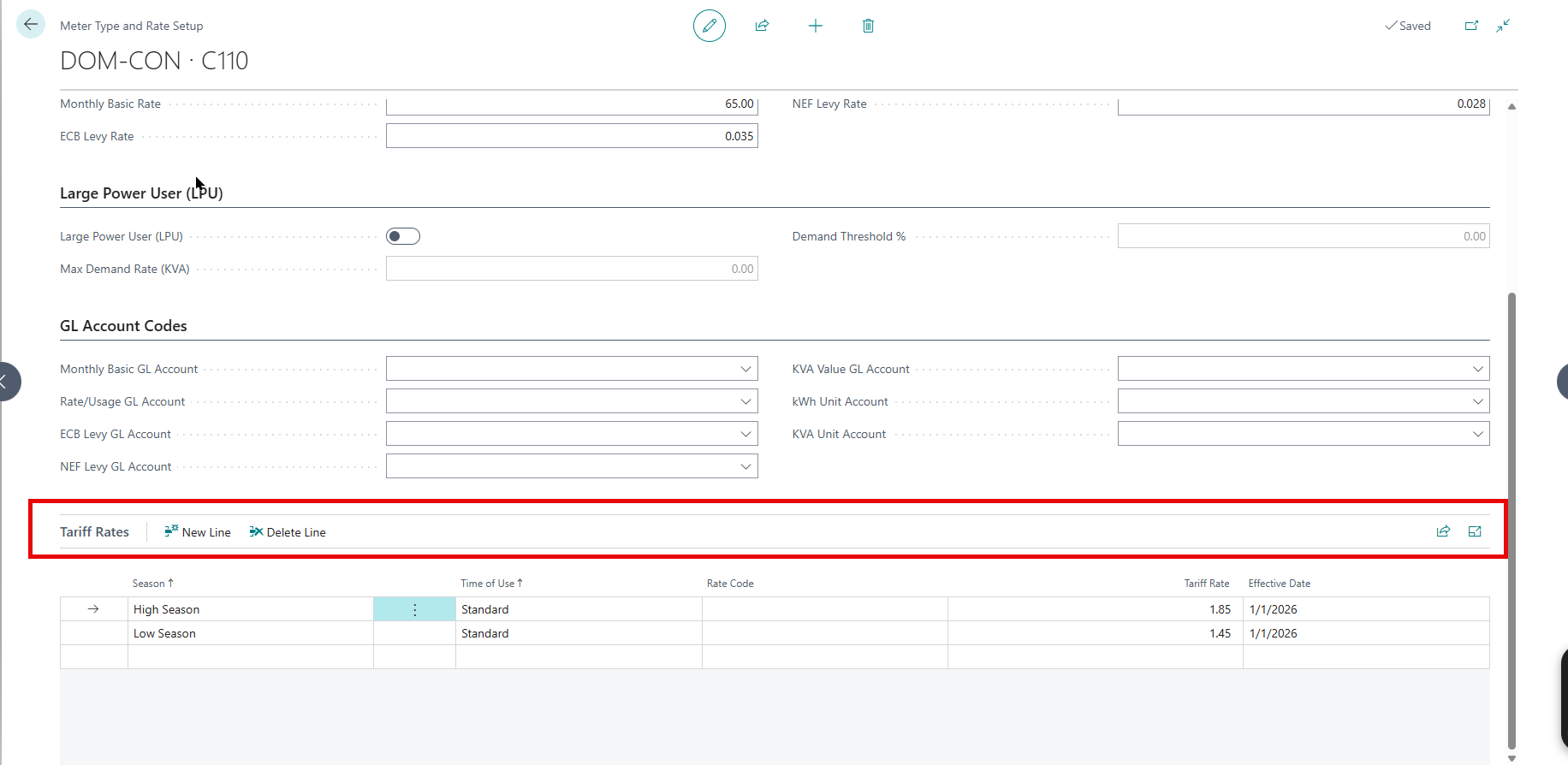
How Seasons and TOU Combine: A full TOU meter is billed across six register buckets --- Peak, Standard and Off-Peak, each in High and Low season. Make sure every bucket your meters use has a tariff line, or that consumption won’t price.
Net Metering (Solar Buy-Back) Rates
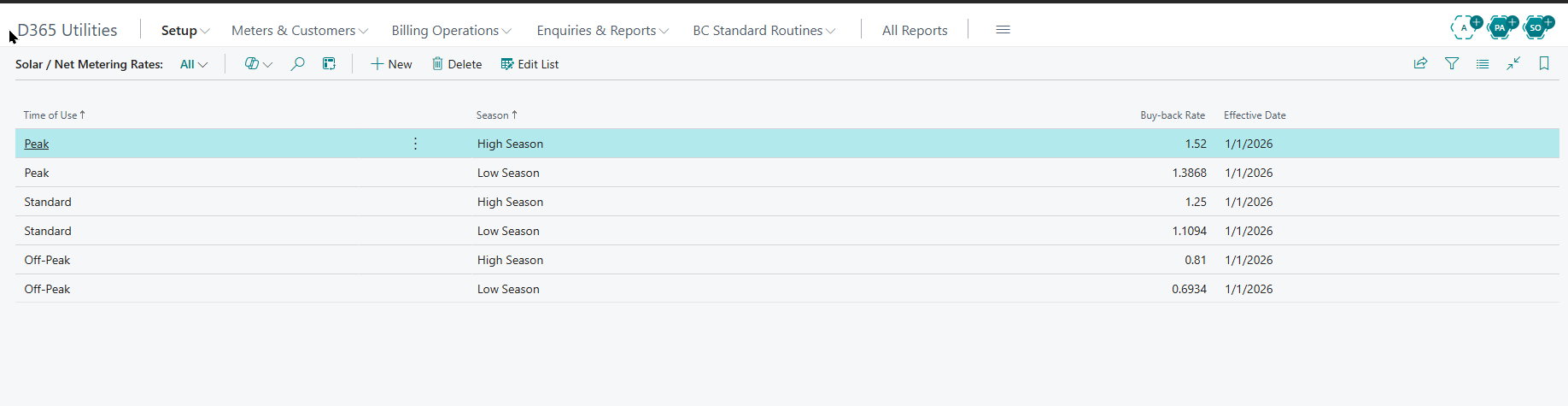
Open d365U Net Metering Rates. These are the rates at which the utility buys back exported solar energy, by Time-of-Use and Season.
| Field | What it does & how to set it |
|---|---|
| Time of Use | The TOU band the buy-back rate applies to. |
| Season | High or Low season. |
| Buy-back Rate | Price per exported kWh credited to the customer. |
| Effective Date | When the rate takes effect. |
Solar Credit Setup
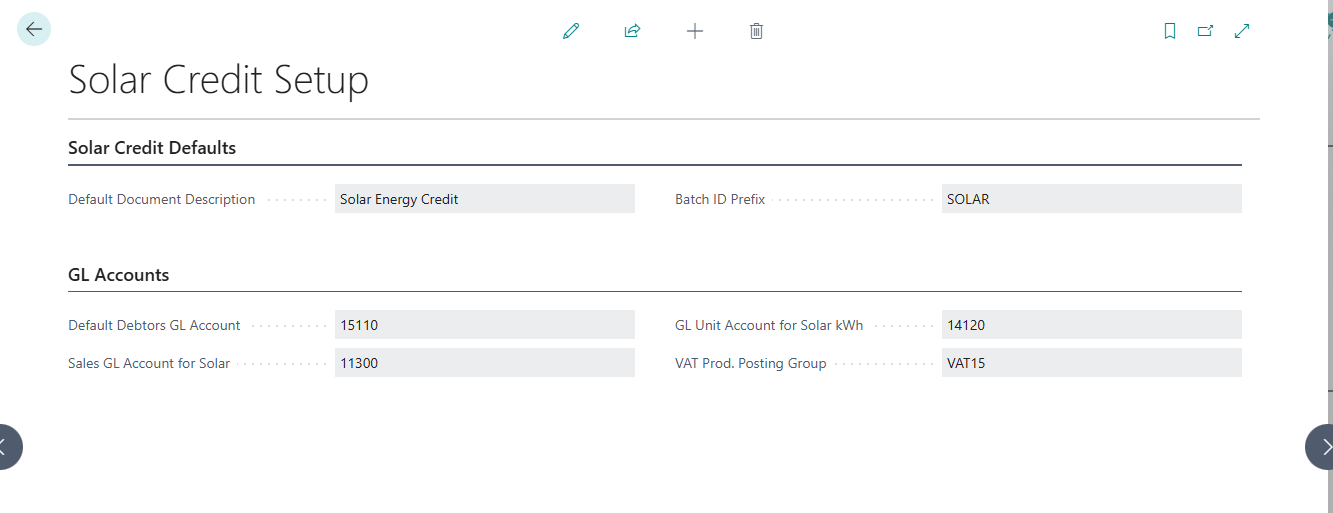
Open d365U Solar Credit Setup (single record) to set the defaults used when solar credit documents are generated.
| Field | What it does & how to set it |
|---|---|
| Default Document Description | Text on the credit line (default Solar Energy Credit). |
| Default Debtors GL Account | Debtors account the credit posts against (direct posting). |
| Sales GL Account for Solar | Contra/expense account for the buy-back (direct posting). |
| GL Unit Account for Solar kWh | Statistical account for solar kWh. |
| Batch ID Prefix | Prefix for solar credit batches (default SOLAR). |
| VAT Prod. Posting Group | VAT group applied to solar credits. |
Configurable Levies
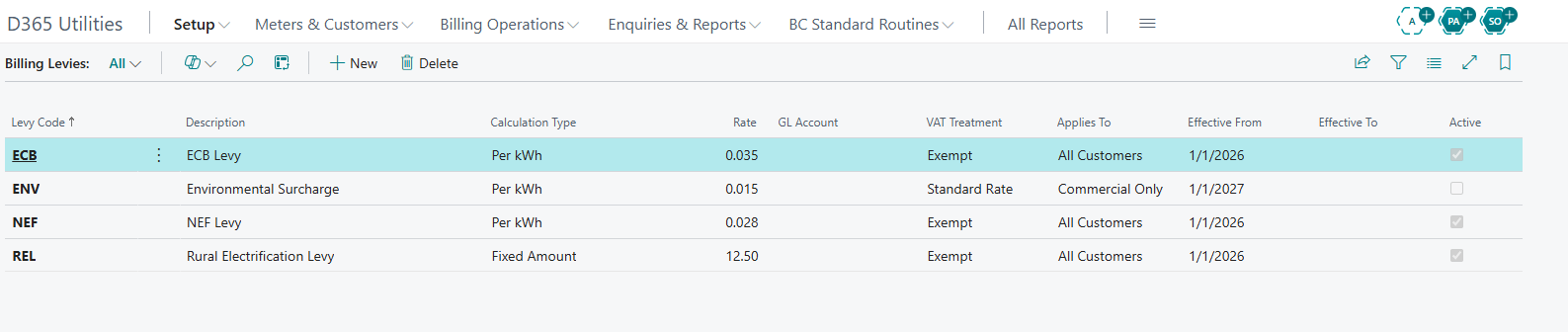
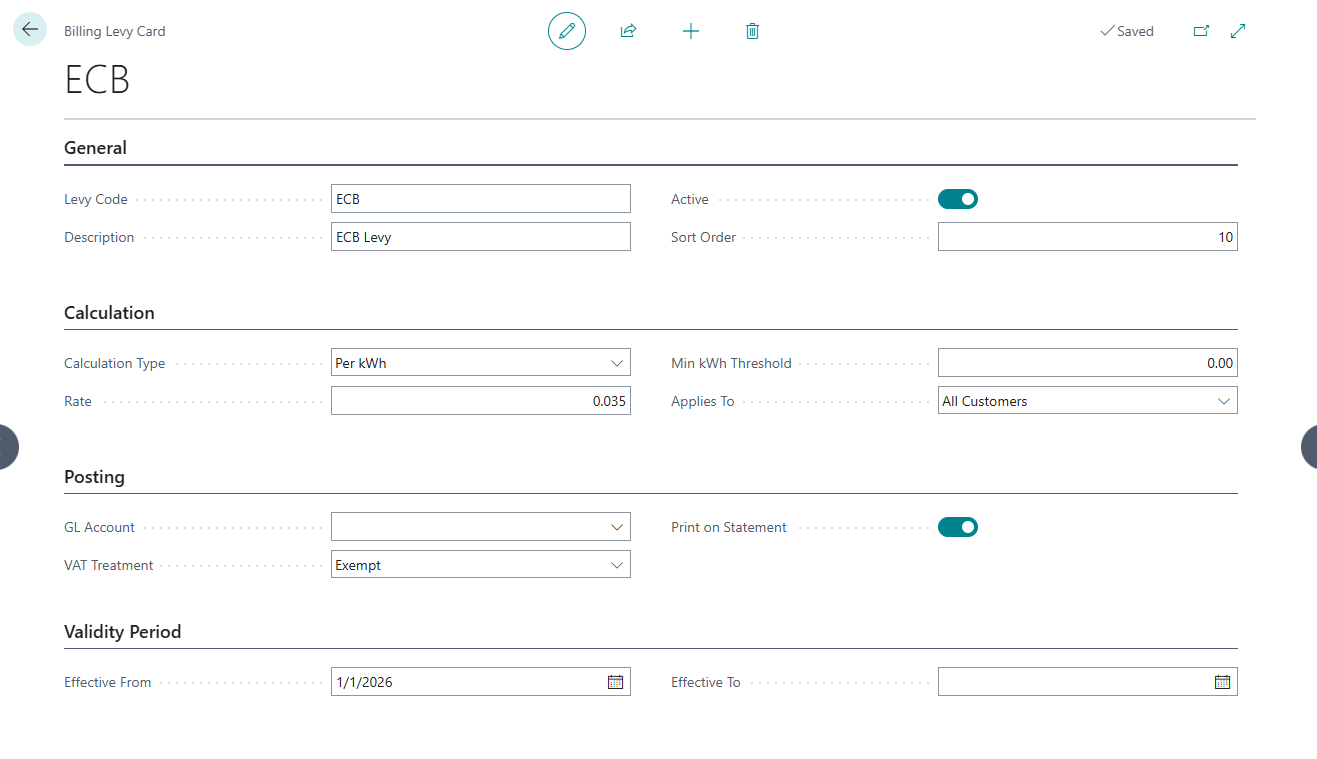
Open d365U Billing Levies. Beyond the built-in ECB/NEF rates, this table lets you add any number of levies by configuration --- the key to adapting the system to new statutory charges without code changes. Levies apply when the rate type has Use Dynamic Levies enabled.
| Field | What it does & how to set it |
|---|---|
| Levy Code | Unique levy code. |
| Description | Readable name; shown on statements if enabled. |
| Calculation Type | Per kWh (rate × units), Fixed Amount (flat), or % of Revenue (rate % of billed revenue). |
| Rate | The value used by the calculation type above. |
| GL Account | Account the levy posts to. |
| VAT Treatment | Exempt, Standard Rate, or Zero Rated. |
| Applies To | Scope: All Customers, LPU Only, Non-LPU Only, Domestic Only, or Commercial Only. |
| Effective From / To | Date window the levy is active (blank = open-ended). |
| Active | Master on/off switch. |
| Sort Order | Controls the order levies appear/print in. |
| Print on Statement | Whether the levy shows as its own line on the bill. |
| Min kWh Threshold | If set, the levy only applies when period usage is at or above this value. |
Disconnection Reasons
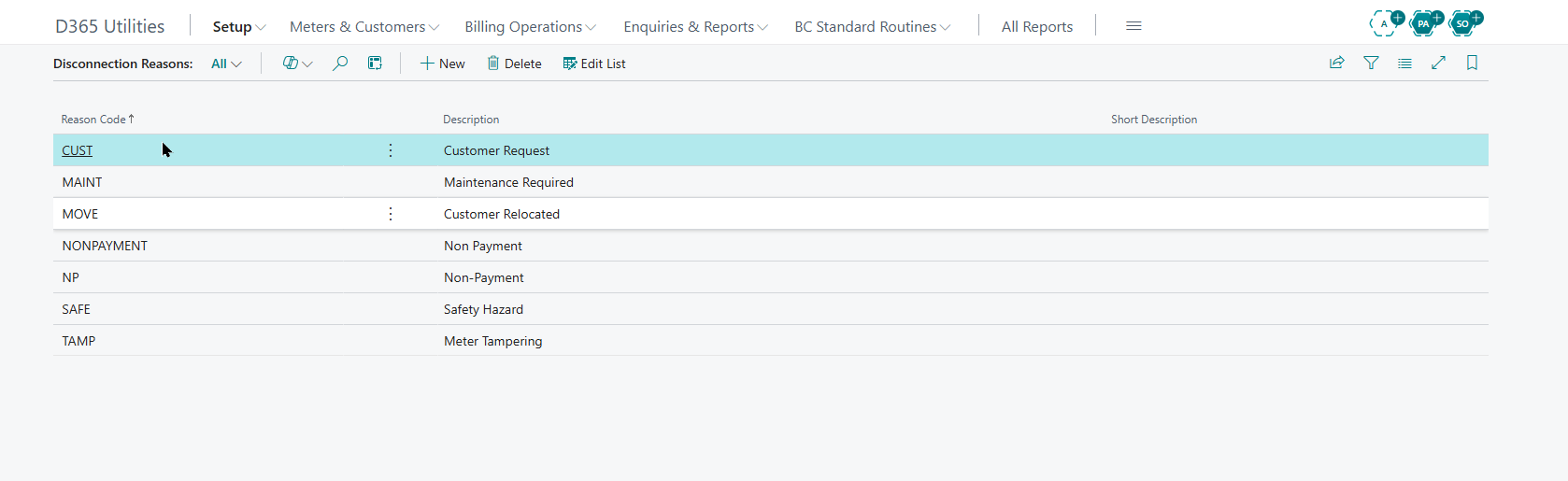
Open d365U Disconnection Reasons and define the reason codes used when raising disconnection or reconnection transactions.
| Field | What it does & how to set it |
|---|---|
| Reason Code | Unique code. |
| Description | Full description. |
| Short Description | Abbreviated label for lists and documents. |
Registering Meters
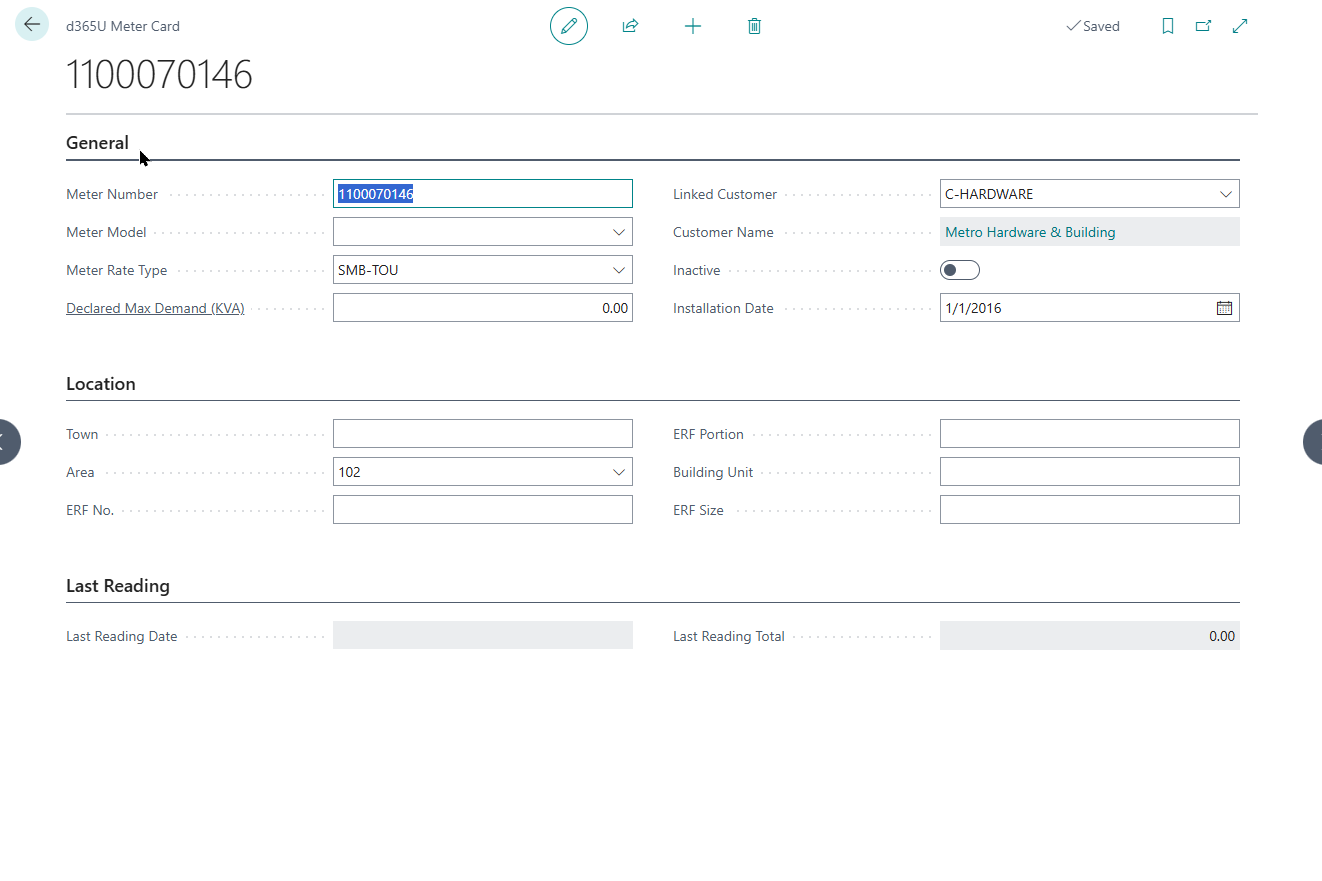
Open d365U Meter List and register each physical meter. Meter numbers must be unique --- the system blocks duplicates.
Identity & Rating
| Field | What it does & how to set it |
|---|---|
| Meter Number | Unique meter identifier. |
| Meter Model | Links to the Meter Model (register/TOU/solar shape). |
| Meter Rate Type | Links to the Meter Rate Type (commercial rating). |
| Declared Max Demand (KVA) | For LPU meters — the contracted KVA used in the demand-threshold calculation. |
| Inactive | Tick to take the meter out of billing without deleting its history. |
Customer & Location
| Field | What it does & how to set it |
|---|---|
| Linked Customer | The BC Customer this meter bills to. |
| Town / Area | Geographic placement; Area links to Town/Area Setup. |
| ERF No. / Portion / Building Unit / ERF Size | Property (erf) identification details. |
| Dog(s) on ERF? | Field-safety flag for meter readers. |
| Installation Date / Delink Date | When the meter was installed and, if applicable, disconnected from the customer. |
| Last Reading Date / Value | System-maintained from the most recent reading. Not edited by hand. |
Linking Customers
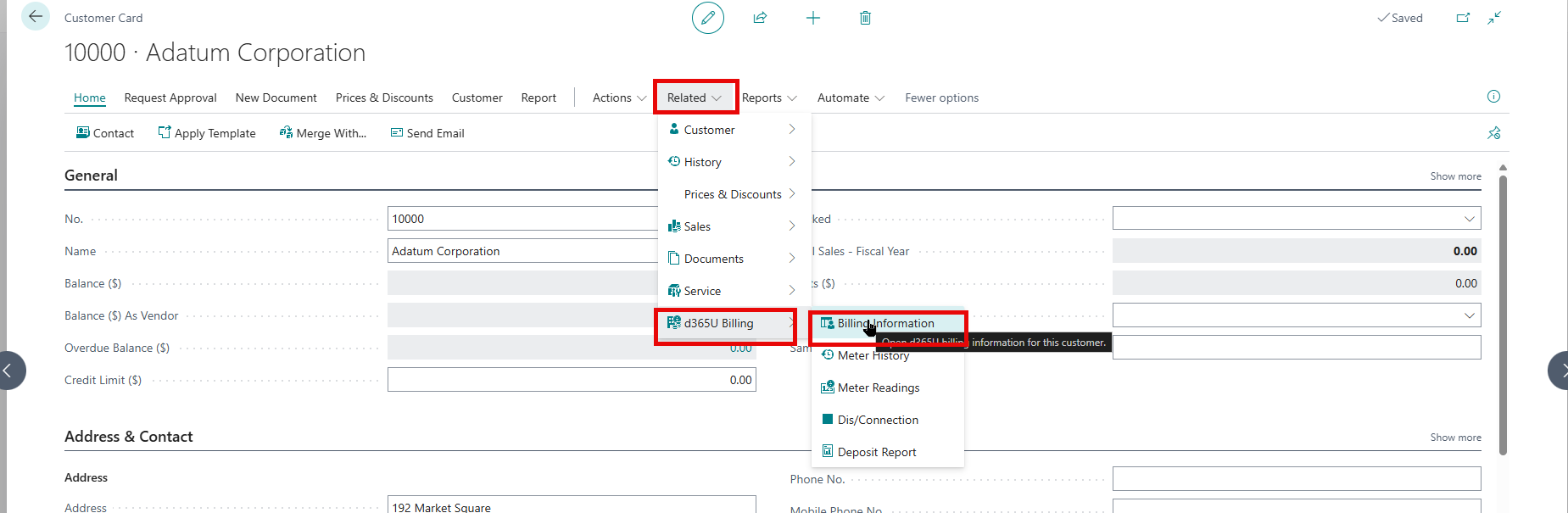
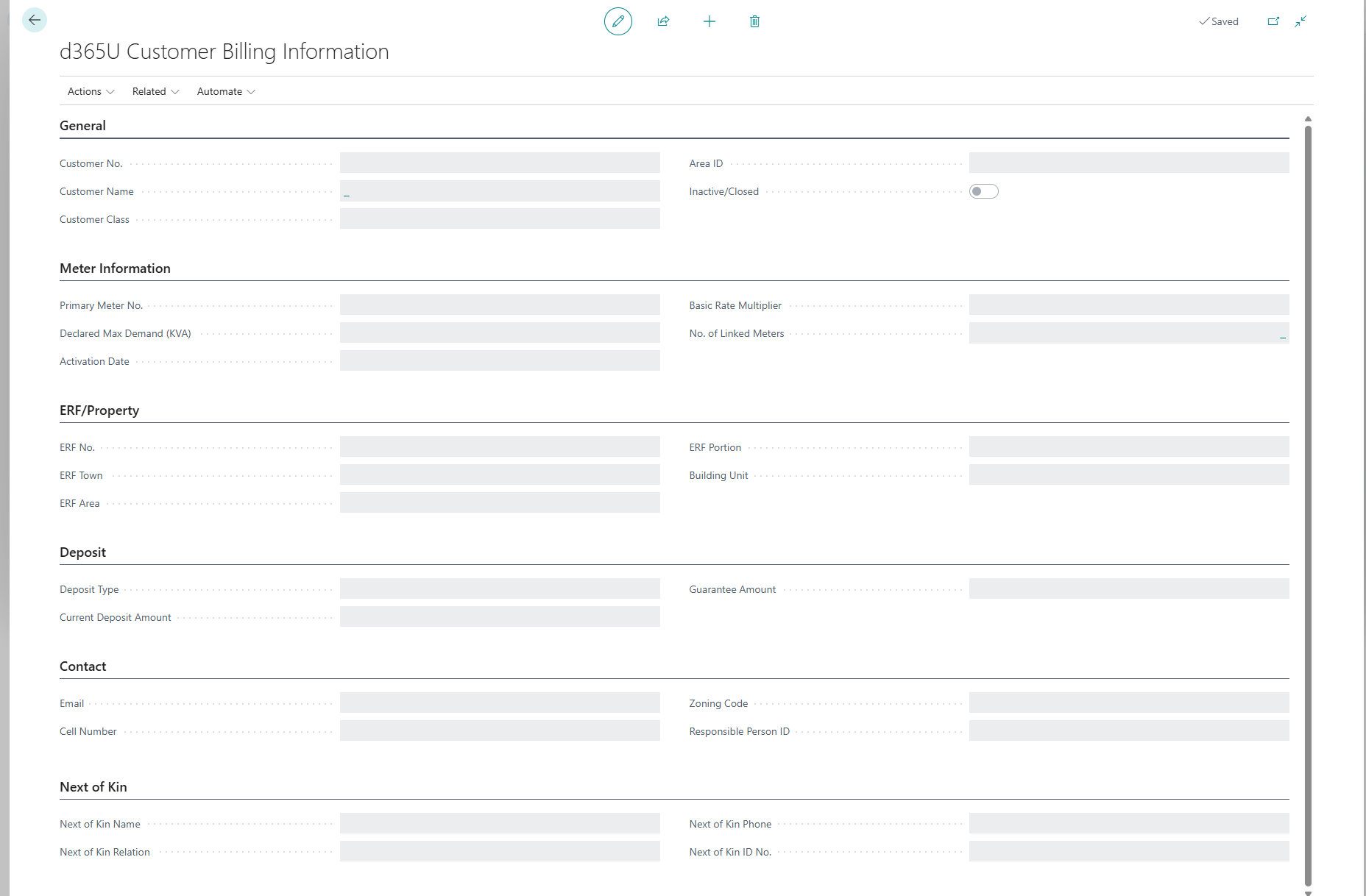
Customers are standard Business Central customers extended with billing information. Open a customer and its d365U Customer Billing card, or the billing info directly, to complete the utility-specific fields.
Billing
| Field | What it does & how to set it |
|---|---|
| Customer No. | The BC customer this record extends. |
| Primary Meter No. | The customer’s main meter. |
| Customer Class | Domestic, Business, LPU, Institutional, Special — drives class-scoped levies and rating. |
| Declared Max Demand (KVA) | Contracted demand for LPU customers. |
| Basic Rate Multiplier | Multiplies the monthly basic charge (default 1) — e.g. for multi-unit premises. |
| Activation Date | When billing starts; set to work date on creation. |
| Inactive/Closed | Tick to stop billing a closed account. |
Deposit
| Field | What it does & how to set it |
|---|---|
| Deposit Type | Deposit (cash held) or Guarantee (third-party guarantee). |
| Current Deposit Amount | System-maintained balance from deposit transactions (see Section 18). |
| Guarantee Amount | Value of a guarantee held in lieu of cash deposit. |
Property, Contact & Next of Kin
The card also holds ERF/property details, zoning, area, email and cell, employer, and next-of-kin/responsible-person details for account administration. Complete the fields relevant to your onboarding process.
Verify Setup Before Going Live
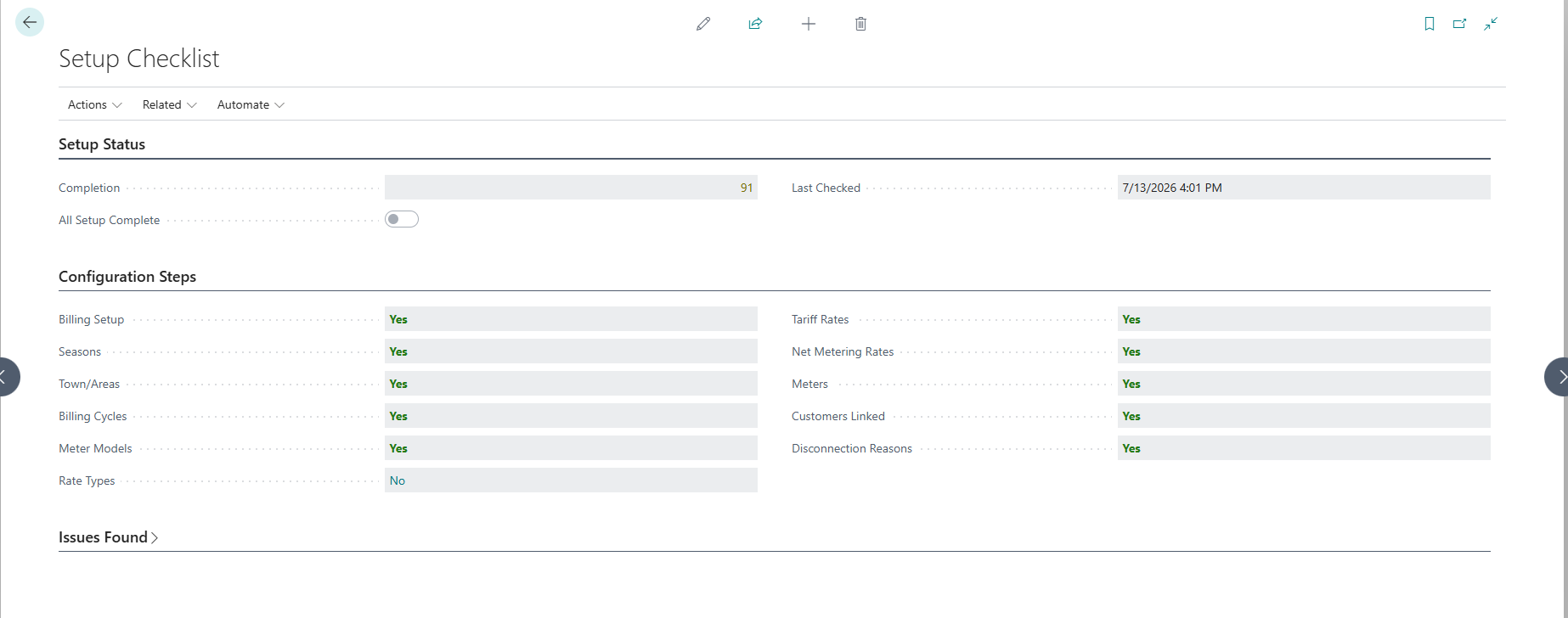
Open the d365U Setup Checklist. It inspects every setup area and reports what is done, an overall completion percentage, and a list of any missing items. Do not run live billing until it reads complete.
| Checklist item | Considered done when… |
|---|---|
| Billing Setup | GL accounts, VAT codes, number series and thresholds are populated |
| Seasons | At least one active season is defined |
| Town/Areas | Service areas are configured |
| Billing Cycles | LPU and Non-LPU cycles exist |
| Meter Models | At least one model is registered |
| Rate Types | At least one meter rate type exists |
| Tariff Rates | Tariff lines exist for the rate types |
| Net Metering Rates | Buy-back rates are defined (if solar is used) |
| Meters / Customers Linked | Meters are registered and linked to customers |
| Disconnection Reasons | Reason codes are defined |