Risk & Compliance Enhancements Guide for Dynamics 365
Summary of Changes
This set of system enhancements introduces structured improvements across the Risk and Compliance capability within Dynamics 365, that includes ISO management system standards and audit expectations. The changes are designed to improve traceability, reusability, and usability while avoiding duplication between Risk and Compliance records.
Key Objectives
- Align Risk and Compliance structures with workflows, and ISO requirements.
- Enable modular, reusable Controls that can be applied consistently across both Risk and Compliance obligations.
- Introduce a dedicated Compliance Review capability to support evidence-based compliance evaluation, verification, and audit readiness.
- Improve categorisation, hierarchy, and reporting of Compliance obligations across regulatory and contractual domains.
- Enhance form usability, layout, and workflow clarity for end-users.
Scope of Enhancements
Risk Register
- Refinement of identification, analysis, evaluation, and treatment workflows.
- Corrections to scoring logic, field placement, and severity labelling.
- Support for multiple treatment Controls through a Risk–Control relationship.
- Continued use of Risk Reviews with improved usability and consistency.
Compliance Register
- Renamed to “Compliance”, with expanded descriptive, legislative, and classification fields.
- Introduction of Compliance categorisation (e.g. Taxation, Employment, ACMA) to support filtering, ownership, and reporting.
- Support for parent–child hierarchy to model legislative structure and obligation relationships.
- Removal of mandatory dependency on Risks, allowing Compliance records to exist independently.
New Entities
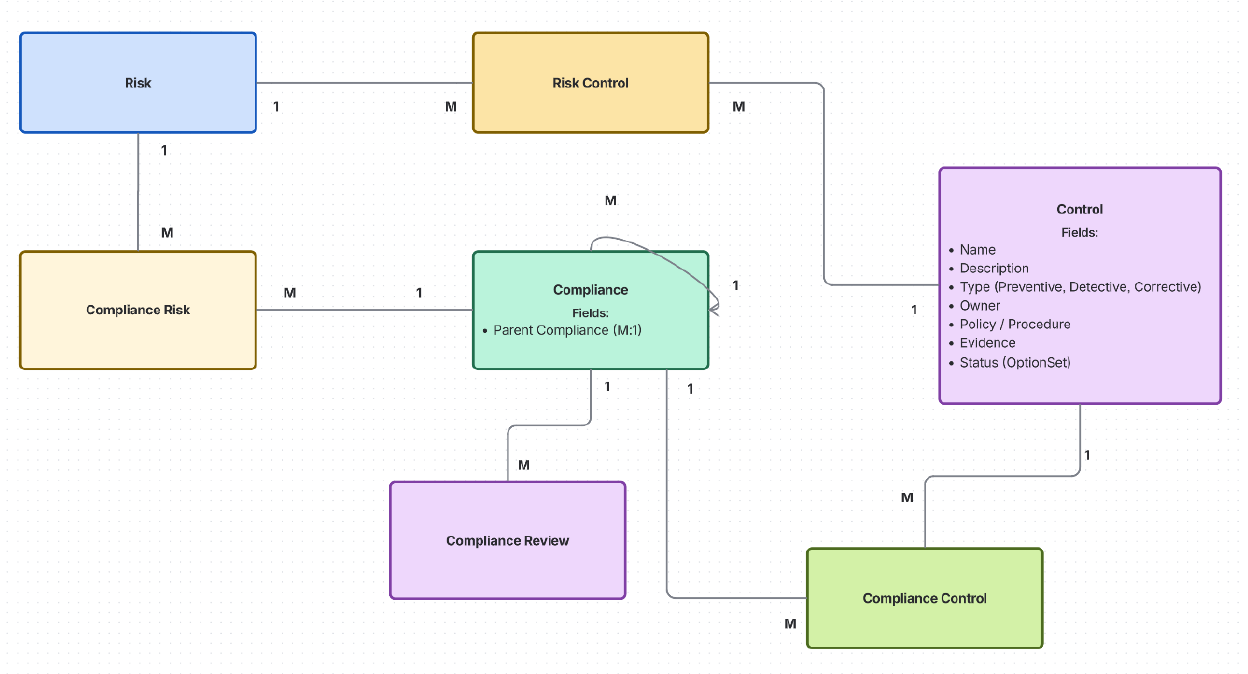
- Control – a reusable entity representing preventive, detective, or corrective measures applicable across Risks and Compliance obligations.
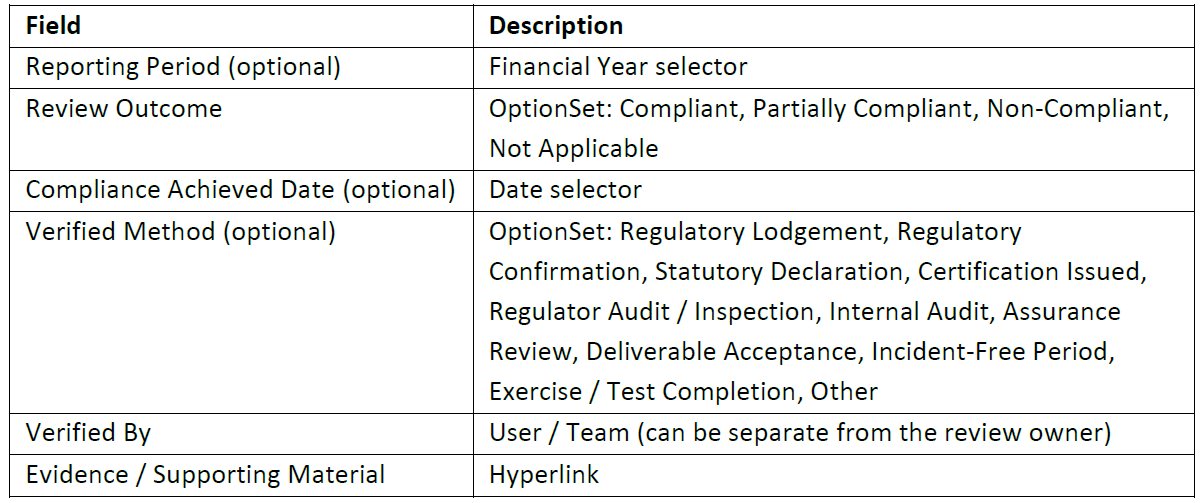
- Compliance Review – a structured review entity mirroring Risk Reviews, extended to capture compliance outcomes, achievement dates, verification methods, verifiers, and supporting evidence.
Relationships
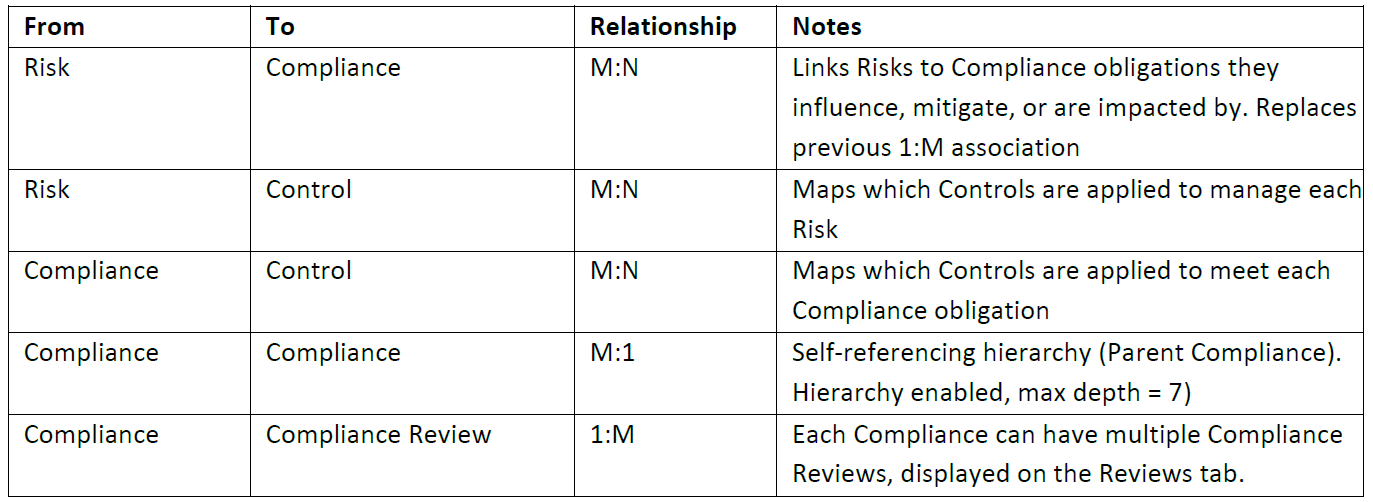
- Risk–Compliance (M:N) to support many-to-many associations without duplication.
- Risk–Control and Compliance–Control (M:N) to enable shared and reusable Controls.
- Parent Compliance (self-referencing M:1 hierarchy) to model legislative and obligation structures.
- Compliance–Compliance Review (1:M) to support repeatable, period-based compliance evaluation.
Menu Structure
- Updated “Risk & Compliance” navigation with a logical, workflow-oriented ordering of Risks, Reviews, Compliance, Controls, and Cases.
Data Structure Changes
Entities
Control
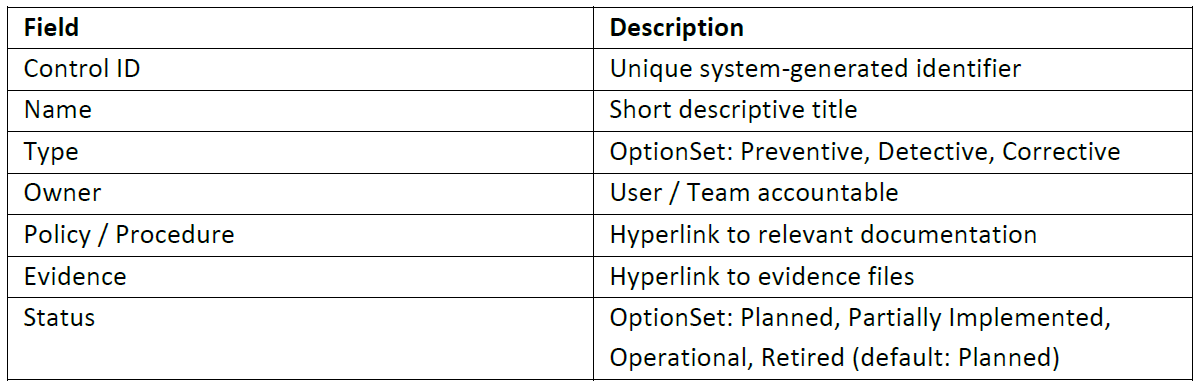
Represents a measure, action, or mechanism implemented to treat risks or ensure compliance. Controls may be preventive, detective, or corrective. A single **Control ** can be applied to multiple **Risk and Compliance ** records.
Form Layout: Sub-grids — Risk Controls and Compliance Controls (M:N relationships).
Core Fields / Attributes
Compliance Review
Support a Compliance Review engine that mirrors the Risk Review engine. Compliance Reviews should be displayed on a new Reviews tab within the Compliance form, using the same layout and presentation as Risk Reviews, with additional fields specified below:
Additional Fields / Attributes
Compliance Form Layout: Displayed on a new Reviews tab within the Compliance form, mirroring Risk Reviews layout.
Relationships
Menu Structure
Sub-Area Title: Risk & Compliance (renamed from Risk Management)
Menu Item Order
- Risks
- Risk Reviews
- Compliance
- Compliance Reviews
- Controls
- Cases
Form Changes & QoL Enhancements
Risk Form Enhancements
-
Identity Tab:
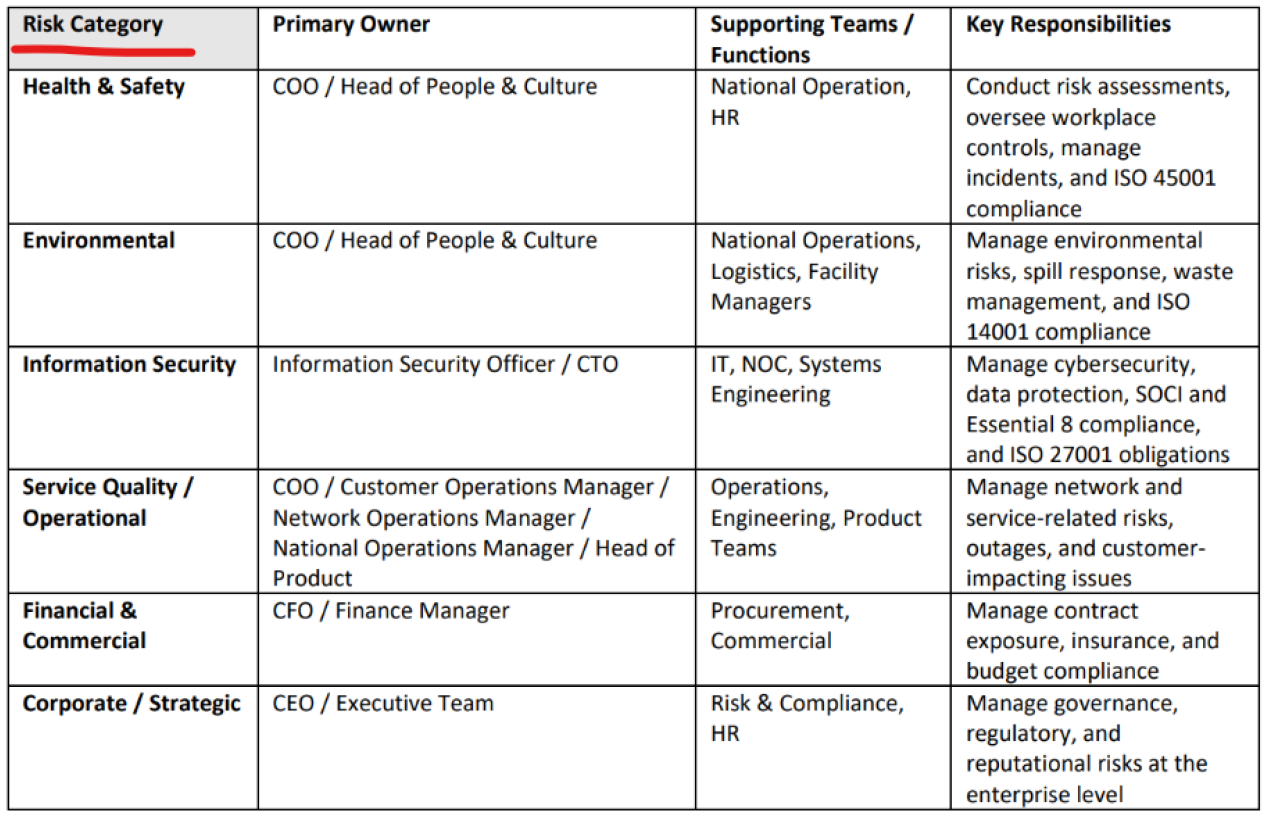
- Categories to be updated to reflect Risk Category definitions – escalated to D365Risks on Dec 10, 2025. – FIXED internally: December 11th, 2025.
- Include Risk Review Frequency “Quarterly” value.
-
Analysis Tab:
- Remove Consequence Level – Risk scoring is based on Severity and Likelihood; Consequence Level is deprecated.
- Correct Severity graphic labels - Should be Asset / Operations instead of Plant Equipment.

- Analysis Completion section should be after Risk Matrix – Inherent.
- Score and Rating don’t update when Risk Analysis Completed is set to Yes. Appears to be a bug.

- Score calculation is not properly calibrated – escalated to D365Risks on Dec 10, 2025 and FIXED on Dec 11, 2025.
-
Evaluate Tab:
- Evaluation Completion section should be after Risk Matrix – Residual.
-
Treatment Tab:
- Treatment Type to reflect the hierarchy of control (Eliminate, Substitute, Engineer, Administrative Controls, Personal Protective Equipment (PPE)) – FIXED internally: December 11th, 2025.
- Include Treatment Type value: No Action Taken (last option).
- Include Risk Acceptance Owner in Treatment Details section.
- Include Risk Acceptance Date in Treatment Details section.
- Include Risk Controls (M:N) sub-grid, enabling multiple Controls to be created or linked to a Risk as part of treatment planning and implementation.
-
Compliances Tab:
- Replace the previous Compliances (1:M) sub-grid to the new Compliance Risk (M:N) sub-grid.
Compliance Form Enhancements
-
General:
- Rename entity from Compliance Register → Compliance (Plural: Compliance).
-
Compliance Tab:
- Add optional Description text area in Compliance Details section.
- Add optional Parent Compliance lookup (M:1, hierarchy enabled) in Compliance Details section.
- Add Classification options: Taxation, Employment / Industrial Relations, Work Health & Safety, Telecommunications / ACMA, Privacy / Data Protection, Environmental, Financial Reporting, Contractual and Other in Compliance Details section.
- Remove Risk lookup in Compliance Details. Will be replaced with Risks tab.
- Add Legislation Type options: Determination, Industry Code, Guidelines, Rules and Contract in Legislation section.
- Add mandatory Jurisdiction (OptionSet: Federal, ACT, NSW, NT, QLD, SA, TAS, VIC, WA, Other) in Legislation section.
- Add mandatory text field Regulatory Body in Legislation section.
- Add hyperlink field Supporting Material in Legislation section.
- Add optional date field Compliance End Date in Dates section.
- Add section Compliance Controls to bottom of form.
- Add Compliance Controls (M:N) sub-grid in Compliance Controls section.
-
Hierarchy Tab:
- Add hierarchical visualization (e.g. Hierarchy View) for Parent Compliance self-referencing M:1 relationship (parent-child hierarchy).
-
Risks Tab:
- Add Compliance Risk (M:N) sub-grid.
-
Reviews Tab:
- Add Compliance Reviews (1:M) sub-grid and additional review management controls, mirroring Risk Reviews.