Understanding General Ledger Posting in Dynamics 365 Business Central
Introduction
Like many accounting systems, posting a transaction in a General Journal allows the manual selection of GL Accounts. Posting direct to GL Accounts updates the GL Balance, but does not update the sub-ledger balances e.g. Receivables balance vs Customers’ balance, Inventory balance vs Physical valuation (qty x unit cost).
Here are some tips to know:
-
Method of preventing reconciliation issue – disable Direct Posting flag for the GL account (i.e. prevent the use of “direct posting to certain GL accounts with sub-ledger associations”).
-
Use of specific transaction types (e.g. Sales Order, Purchase Order) and special journal types (e.g. Sales Journal, Item Journal) – that allow updates into both GL Balance and sub-ledger balance.
-
These specific transactions and special journals use Posting Groups to default the necessary GL Accounts.
Posting Group - Accounting Implications
By using various transaction types, posting group defaults the GL accounts.
Balance Sheet Accounts
Various posting groups impact the following:
- Bank (Cash) i.e. cash receipt or payment journal – Bank Account Posting Group
- Debtor / Receivables – i.e. sales or sales return – Customer Posting Group
- Inventory – inventory journals, purchase or sales order – Inventory Posting Group and Inventory Posting Setup
- Creditor / Payables – purchase or purchase return – Vendor Posting Group
Profit/Loss Accounts
Posting groups impact sales and purchase accounts through the General Posting Setup:
- Sales, Sales CR, line discount, invoice discount, payment matching tolerance, sales prepayment
- Purchase, Purchase CR, line discount, invoice discount, paymt matching tolerance, purchase prepayment
- COGS and COGS (Interim)
- Inventory Adjustment
- Inventory Accrual Interim (Receipt not invoiced)
- Direct Cost Applied Account (for warehouse/purchase receipt)
- Various variance accounts if Standard Costing method is used
Posting Group – Purchasing Transactions (Inventory items with unit costs)
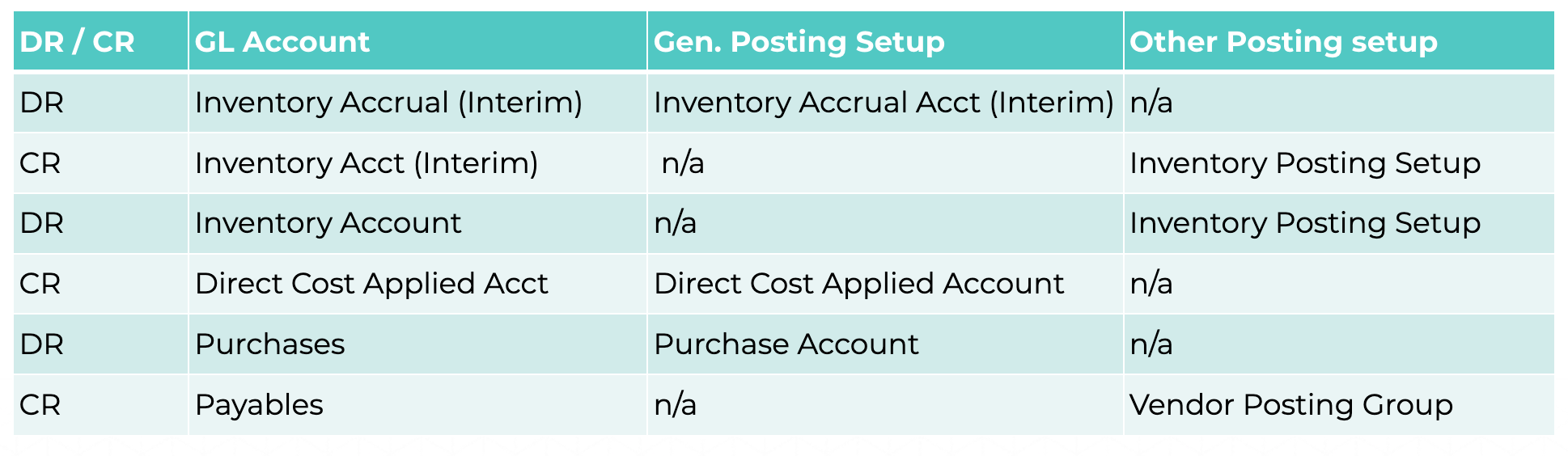
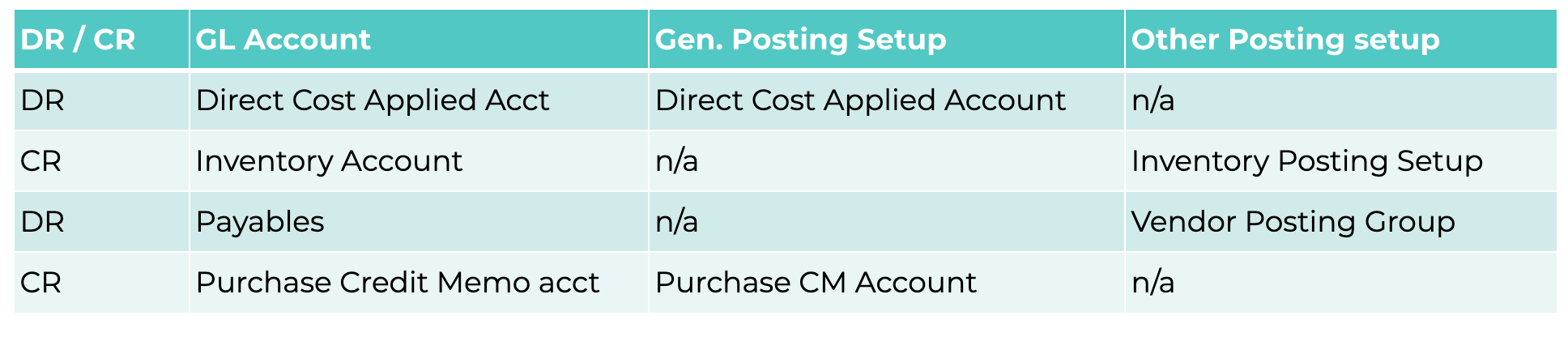
The following table shows the impact of posting groups on purchasing transactions for inventory items with unit costs.
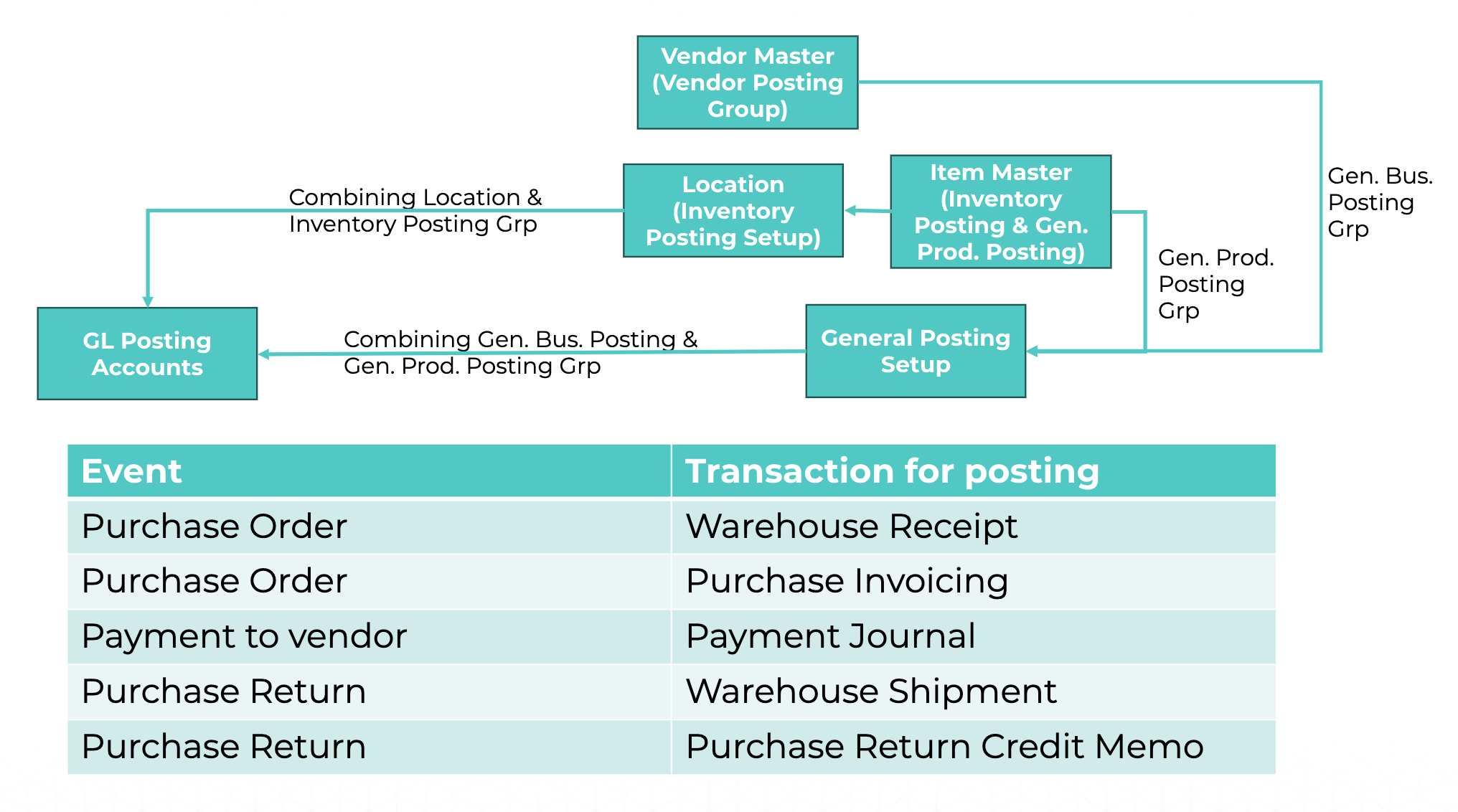
PO – Warehouse Receipt Posting

PO – Purchase Invoice Posting
PO – Returns or Credit Memo from Invoice Cancelling
Vendor Payments (Payment Journal)

Posting Group – Purchasing Transactions (Non-inventory items with unit costs)
PO – Warehouse Receipt not applicable for non-inventory items.
Posting of Purchase Order

Vendor Payments (Payment Journal)

Posting Group – Sales Transactions (Inventory items with unit cost and price)
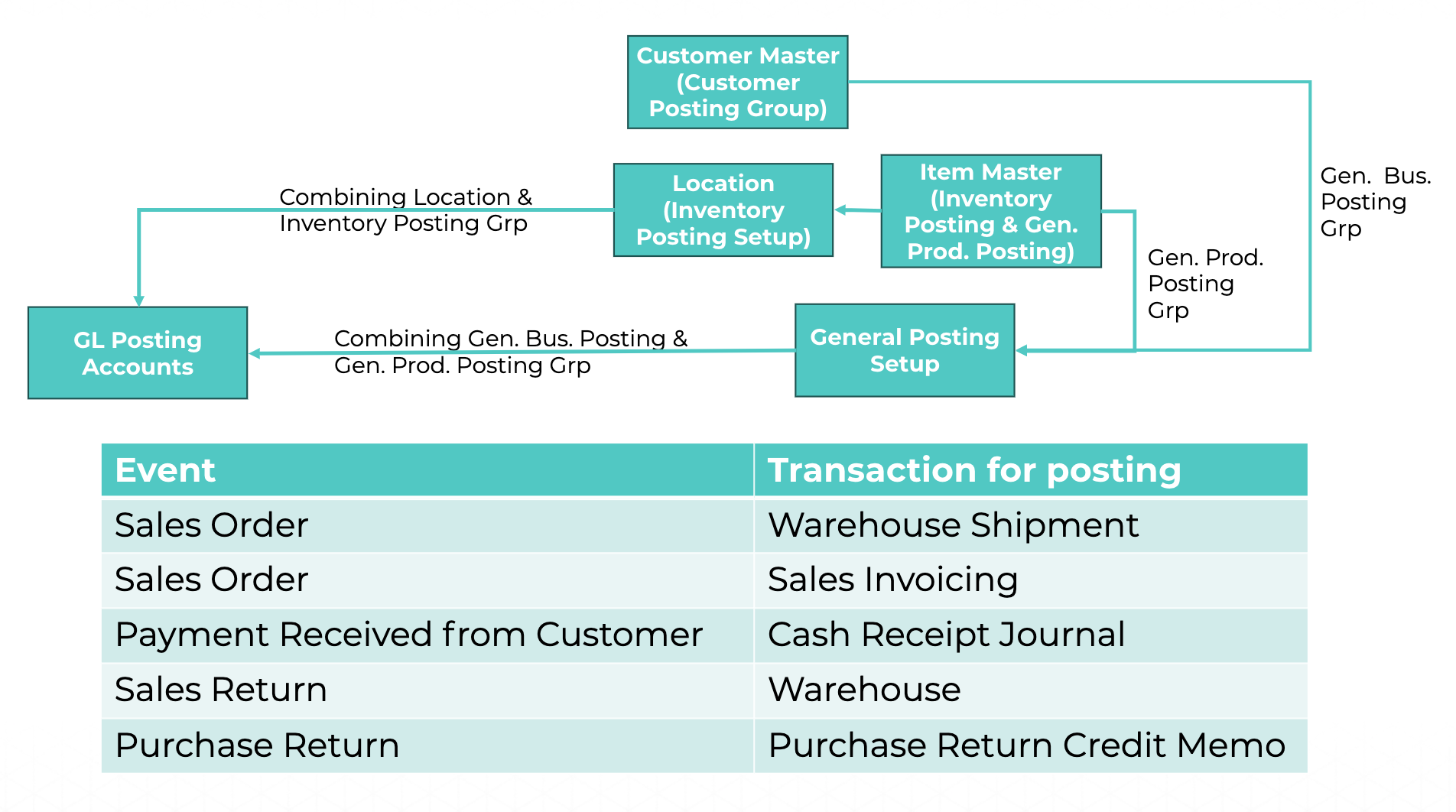
SO – Warehouse Shipment Posting
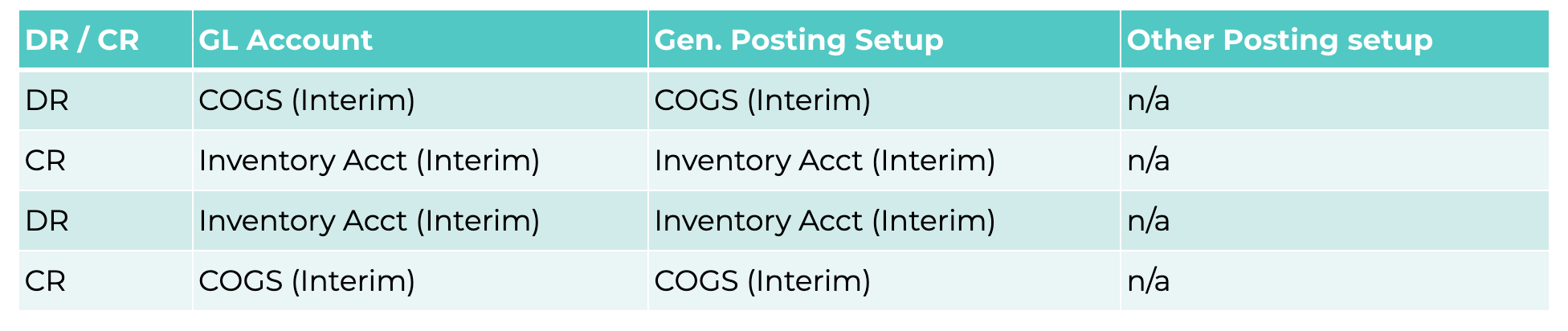
SO – Sales Invoice Posting
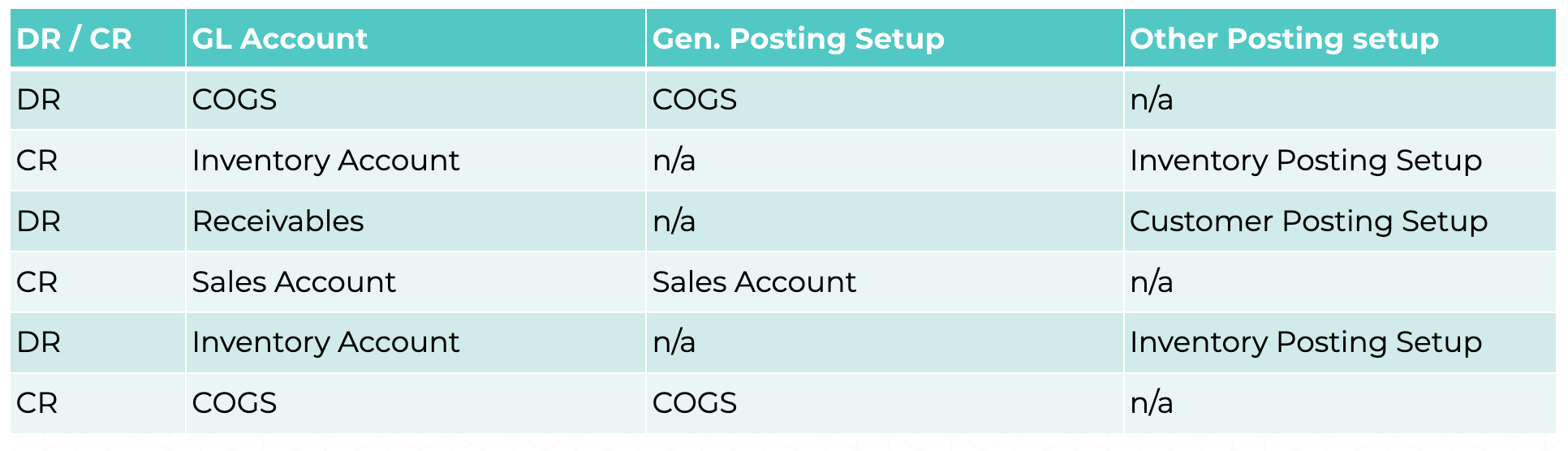
SRO – Returns or Credit Memo from Invoice Cancelling

Customer Payments (Cash Receipt Journal)

Posting Group – Sales Transactions (Non-inventory items with unit cost and price)
SO – warehouse shipment not applicable.
Posting of Sales Order

Customer Payments (Cash Receipt Journal)

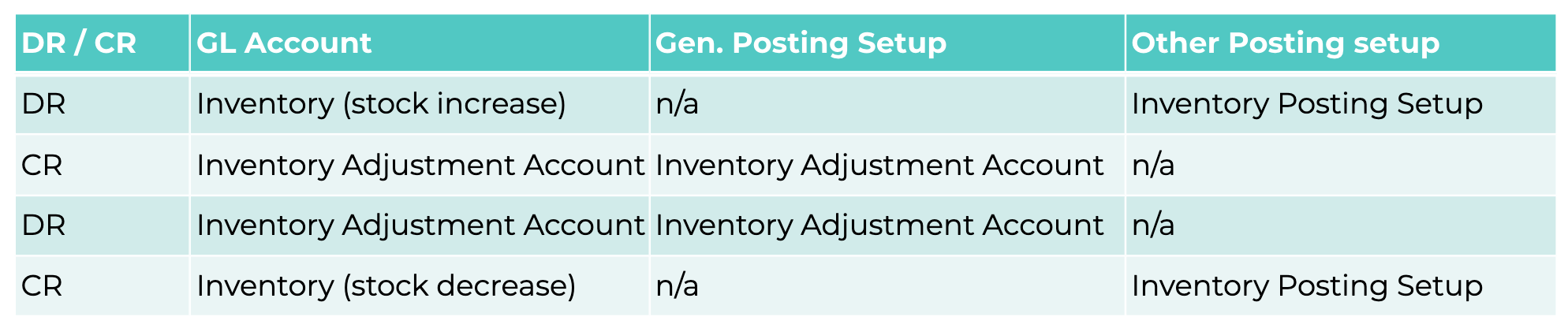
Posting Group – Other inventory sub-ledger transactions (For inventory items)
Stock Adjustment – To increase/decrease the inventory on-hand quantities Physical Inventory Count – Also increases/decreases quantities on-hand
Written By:
Peter Loo
Team Leader, Business Central
Connect on LinkedIn